0 ratings


Articol nr.:
203232166
WD22TB4 Dell Docking Station, Performance Dock WD22TB4, 180W Adapter + 130W Power Delivery, Support Dual/Triple Monitor & 4K Displays, with Fkafusion
Articol nr.:
203232166
MDL 5956
Detalii preț
Fără taxele de livrare și vamale ( taxele de livrare și vamale vor fi calculate la finalizarea comenzii )
*Toate articolele vor fi importate din SUA
În stoc
 Importat din USA
Cant.:
Comandați acum și primiți Sunday, August 16
Tranzacție securizată
Ubuy depune eforturi pentru a vă proteja securitatea și confidențialitatea. Sistemul nostru avansat de securitate a plăților asigură confidențialitatea prin criptarea informațiilor dvs. în timpul transmisiei folosind protocoalele AES (Advanced Encryption Standards) și SSL (Secure Socket Layer). Detaliile dvs. de plată sunt 100% sigure, deoarece nu partajăm datele dvs. de plată cu vânzători terți.
Partenerii noștri principali de logistică


Upgrade your Dell docking station effortlessly with the Dell Thunderbolt Dock WD22TB4 and experience SuperBoost technologies for fast charging and data transfer at an incredible 40 GB/s.

Fast
Shipping

Retur
gratuit*

Ambalaj sigur

Produse originale 100%

PCI DSS Compliance

ISO 27001 Certified


Note: Step Down Voltage Transformer required for using electronics products of SUA store (110-120). Recommended power converters Cumpărați Acum.


Ce Iese în evidență
High Power Delivery
Equipped with a robust 180W power adapter, this docking station provides 130W power delivery, ensuring rapid charging for your Dell laptop and other devices while maintaining peak performance.
Versatile Connectivity
The WD22TB4 Dock offers multiple ports, including Thunderbolt 4, USB-C, and HDMI, allowing seamless connection to various peripherals, enhancing productivity for professionals who require flexibility and efficiency.
Enhanced Performance
Designed specifically for Dell laptops, the WD22TB4 ensures optimized performance and compatibility, minimizing latency and maximizing data transfer speeds, making it a perfect choice for power users.
Detalii produs
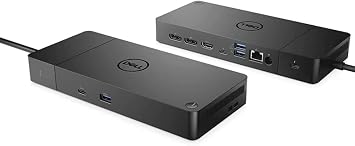
- [Multi-Functional Port Options] Equipped with 2 x Thunderbolt 4 Port, 2 x DisplayPort, 1 x HDMI Port, 1 x USB 3.2 Gen 2 Type-C Port, 1 x USB Type-C DisplayPort, 3 x USB 3.2 Gen 1 Type-A Port, 1 x Gigabit Ethernet.
- [Strong Power Supply] The Dell thunderbolt dock WD22TB4 provides up to 130W of power transmission, a single cable connects the monitor and peripheral devices to your system, with data transfer speeds of up to 40 GB/s maximizing the utilization.
- [Tech Upgrade] The Modular Thunderbolt 4 Expansion Dock features interchangeable modules for even easier upgrades and SuperBoost technology for fast charging.
- [High Compatibility] Dell docking station WD22TB4 not only provides extensive compatibility for Dell commercial laptops. The dell docking station also supports Thunderbolt Compatible with laptops from other manufacturers that meet industry standards.
- [Quality After Sales Service] We have equipped WD22TB4 with suitable cables. FKA provides 24-hour response time, 1-year replacement service (in case of non-human damage), and 3-year maintenance support.
| Hardware Interface | DisplayPort, Ethernet, HDMI |
| Compatible Devices | Lenovo, Dell, HP, MAC |
| Total Usb Ports | 5 |
| Number of Ports | 11 |
| Total Number of HDMI Ports | 1 |
| Wattage | 180 |
| Color | Black |
| Brand | FKAfusiontech |
| Unit Count | 1.0 Count |
| Manufacturer | SHFKA |
| Total USB Ports | 5 |
| Total HDMI Ports | 1 |
| Number of Items | 1 |
| Item Weight | 3.5 lbs (1.59 kg) |
Cine Ar Trebui să Cumpere?

-
Professionals
Ideal for business users needing multiple connections for devices, enhancing productivity and reducing cable clutter.
-
Gamers
Great for gamers wanting high-speed data transfer and multiple monitor support for an immersive gaming experience.
-
Creative Teams
Perfect for design and video editing professionals requiring extensive connectivity for high-resolution displays and peripherals.

-
Casual Users
Not suited for casual users who require minimal connectivity and may not utilize the dock's full capabilities.
DESCRIEREA PRODUSULUI
Aveți întrebări? Discutați cu noi
Căutări Conexe
Întrebări și răspunsuri ale clienților
-
Întrebare:
What devices are compatible with the WD22TB4 Dell Docking Station?
Răspuns: The WD22TB4 Dell Docking Station is compatible with a wide range of laptops that have USB-C or Thunderbolt 3 ports. This includes popular brands like Dell, HP, Lenovo, and Apple. It provides connectivity for dual/triple monitors and supports 4K displays, making it ideal for professionals who require multiple screens for enhanced productivity. For instance, if you’re using a Dell XPS laptop, you can connect multiple monitors for a more expansive workspace. -
Întrebare:
How does the Power Delivery feature of the WD22TB4 enhance usability?
Răspuns: The Power Delivery feature of the WD22TB4 provides 130W of power to your laptop, which means you can charge your device while using the docking station. This is particularly beneficial in a busy office environment where every outlet counts. By using this docking station, you ensure your device remains powered during important tasks, such as video editing or data analysis, without the hassle of managing multiple power adapters. -
Întrebare:
Can I use the WD22TB4 with multiple monitors?
Răspuns: Yes, the WD22TB4 supports connecting dual or triple monitors simultaneously, enabling an extensive digital workspace. With capabilities for 4K displays, you can enjoy clearer images, making it perfect for graphic design, video editing, and multitasking. If you often find yourself switching between applications, having multiple monitors can significantly increase efficiency and provide a more immersive experience. -
Întrebare:
What type of cables are included with the WD22TB4?
Răspuns: The WD22TB4 includes Fkafusion Tech HDMI and DisplayPort cables, providing everything you need for immediate setup. These cables ensure high-quality video output to monitors, enhancing your visual experience, especially for tasks requiring precision like design work or presentations. When setting up your workstation, you can plug in these cables directly to your monitors without the need for additional purchases. -
Întrebare:
Is the WD22TB4 suitable for gaming?
Răspuns: While the WD22TB4 is primarily designed for productivity, it can also support gaming on compatible devices. Its dual/triple monitor setup allows for an immersive gaming experience, especially for strategy and simulation games that benefit from multiple screens. However, the performance will also depend on your laptop’s graphics capabilities. For gaming enthusiasts, connecting to higher resolution screens can enhance the overall gaming experience. -
Întrebare:
What is the maximum resolution supported by the WD22TB4 docking station?
Răspuns: The WD22TB4 docking station supports up to two 4K displays at 60Hz. This capability is essential for high-resolution tasks such as video editing, 3D rendering, or detailed data analysis, where clarity and detail are critical. It provides a seamless visual experience, allowing users to work efficiently across multiple high-resolution applications, especially beneficial for professionals in creative fields. -
Întrebare:
How does the WD22TB4 manage heat during extended use?
Răspuns: The design of the WD22TB4 includes built-in heat management features to ensure efficient cooling during extended use. This is important for maintaining performance levels, especially during intensive tasks such as video rendering or multitasking across multiple screens. Proper heat management reduces the risk of throttling, allowing your devices to perform optimally without overheating. -
Întrebare:
What type of user would benefit most from the WD22TB4 Dell Docking Station?
Răspuns: The WD22TB4 is ideal for professionals who rely on multiple displays for productivity, such as graphic designers, financial analysts, or software developers. Its dual/triple monitor support and high power delivery capabilities make it a valuable tool for anyone needing to increase workspace efficiency and manage various applications simultaneously. You can streamline your workflow and enhance productivity, making it an investment for serious professionals. -
Întrebare:
Where can I buy the WD22TB4 Dell Docking Station?
Răspuns: You can buy the WD22TB4 Dell Docking Station from Ubuy. Ubuy offers a variety of tech products, ensuring you find the right device that meets your specific needs. With Ubuy’s user-friendly platform, you can easily navigate to purchase the docking station and explore additional tech accessories to complement your setup. -
Întrebare:
Does the WD22TB4 require drivers for installation?
Răspuns: Typically, the WD22TB4 Dell Docking Station does not require additional drivers for installation as it is designed to be Plug and Play. Once you connect it to a compatible laptop, it should automatically install the necessary drivers. However, it's always recommended to check Dell's support site for the latest updates or drivers to ensure optimal performance and compatibility with your specific device.
FKAfusiontech Docking Stations Editorial Review
Nu s-au găsit recenzii editoriale
Recenziile și evaluările clienților
2 evaluări ale clienților
-
5 stele
100%
-
4 stele
0%
-
3 stele
0%
-
2 stele
0%
-
1 stele
0%
Faceți o recenzie pentru acest produs
Împărtășiți-vă părerea cu alți clienți
Pro
- High-speed data transfer
- Multiple connectivity options
- Compact and sleek design
- Supports dual 4K displays
- Trustworthy brand reputation
Contra
- Limited color options available.
ÎNCREDERE ÎN PLATFORMĂ ȘI SIGURANȚA CUMPĂRĂTORULUI

MA
Mohammad
Cumpărător verificat
“Excellent quality and original too,when ubuy send original things I will appreciate that ,I very satisfied thank you”
23 July 2026 · via Trustpilot
CK
Chitra
Cumpărător verificat
“The order and delivery progress was communicated very well. Package arrived within the estimated time. Products arrived as expected in good condition.”
22-Jul-26 · via Trustpilot
K
kund
Cumpărător verificat
“Good supply of products. Safe payment methods, and shipment worldwide! Genuine products.”
23-Jul-26 · via Trustpilot
OO
Onesi
Cumpărător verificat
“Was my first time buying a product from Ubuy, but I found it so helpful. This is reliable. Gonna place a new order!”
22 July 2026 · via Trustpilot
SJ
SAO JOHN
Cumpărător verificat
“Ubuy is a great online platform to buy stuff. Reliable, fast delivery time and great value for money. I've been using Ubuy online shopping platform for three years now and will continue to do so.”
23 July 2026 · via Trustpilot
Checkout securizat
Livrare internațională
Returnări ușoare
Produse Autentice
Top selling Dell Docking Station in Moldova




Last Updated on July 23, 2026
Istoricul prețului produsului
Important
- Limitări: Pentru produsele expediate la nivel internațional, vă rugăm să rețineți că este posibil ca garanția producătorului să nu fie valabilă; este posibil ca opțiunile de service ale producătorului să nu fie disponibile; este posibil ca manualele, instrucțiunile și avertismentele de siguranță ale produsului să nu fie în limba țării de destinație; este posibil ca produsele (și materialele însoțitoare) să nu fie proiectate în conformitate cu standardele, specificațiile și cerințele privind etichetarea din țara de destinație; este posibil ca produsele să nu fie conforme cu voltajul și cu alte standarde electrice din țara de destinație (necesitând utilizarea unui adaptor sau convertor, dacă este cazul). Destinatarul este responsabil pentru asigurarea faptului că produsul poate fi importat legal în țara de destinație. Când comandați de pe Ubuy sau de la afiliații acestuia, destinatarul este importatorul înregistrat și trebuie să respecte toate legile și reglementările din țara de destinație
- Nu toate produsele listate pe Ubuy sunt de vânzare, deoarece Ubuy este un motor de căutare global. Produsele sunt supuse reglementărilor privind exportul/comerțul.
MDL 5956
Comandați acum și primiți Sunday, August 16
This item is not restrict in my country.(Please click on above link if this item is not restrict in your country, So our team will review and allow.)
Cant.:
Tranzacție securizată
Conform PCI DSS și certificat ISO 27001:2022, cu plăți criptate și protecție completă a cumpărătorului la fiecare comandă.
Partenerii noștri principali de logistică
Cea mai rapidă livrare transfrontalieră
Caracteristici și avantaje
- Effortless upgrades with swappable module capability.
- Experience fast charging with SuperBoost technology.
- Achieve data transfer speeds of up to 40 GB/s.
- Maximize peripheral performance seamlessly.
- Modular design for future-proofing your setup.
- Ideal for enhancing productivity and connectivity.
Asigurare Ubuy
Bucură-te de o experiență de cumpărare fără griji, cu produse 100% originale, securitate a plăților conformă cu standardul PCI DSS, protecție a datelor certificată ISO 27001, cea mai rapidă livrare internațională, retururi gratuite și ambalare securizată pentru fiecare comandă.*